
Email Automation Alerts
Email Automation Alerts
Automate property alerts and keep leads engaged
Automation that keeps working when your team isn't.
Email Automation Alerts in Qobrix connect property activity directly to the right leads — no manual intervention required. Here's how it works:
1. Configure your brand and campaign
Set up your agency branding once inside Qobrix and create an Email Automation campaign. Choose your preferred send frequency — twice weekly, weekly, or monthly.
2. Set alert preferences per lead
On each lead record, activate Price Drop alerts, Matching Property alerts, or both. New contacts are automatically sent a consent request, keeping your communications compliant from day one.
3. Qobrix tracks every relevant change
When a new property matches a lead's buying criteria, or a tracked property drops in price, Qobrix detects it in real time — no manual monitoring required.
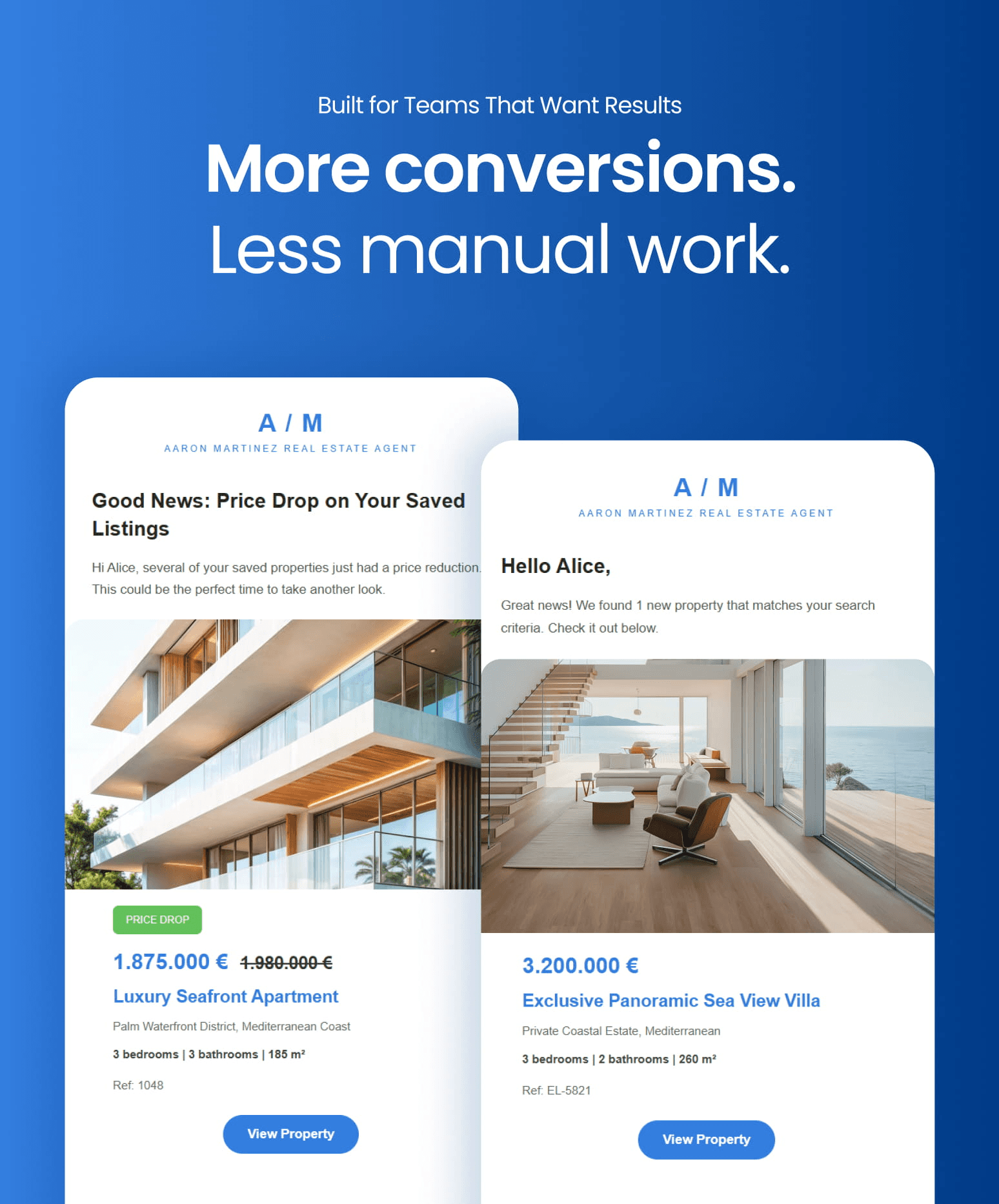
4. Your lead receives a branded email automatically
A fully branded, professionally formatted email is delivered directly to your lead with a link to the property. Zero agent effort required.
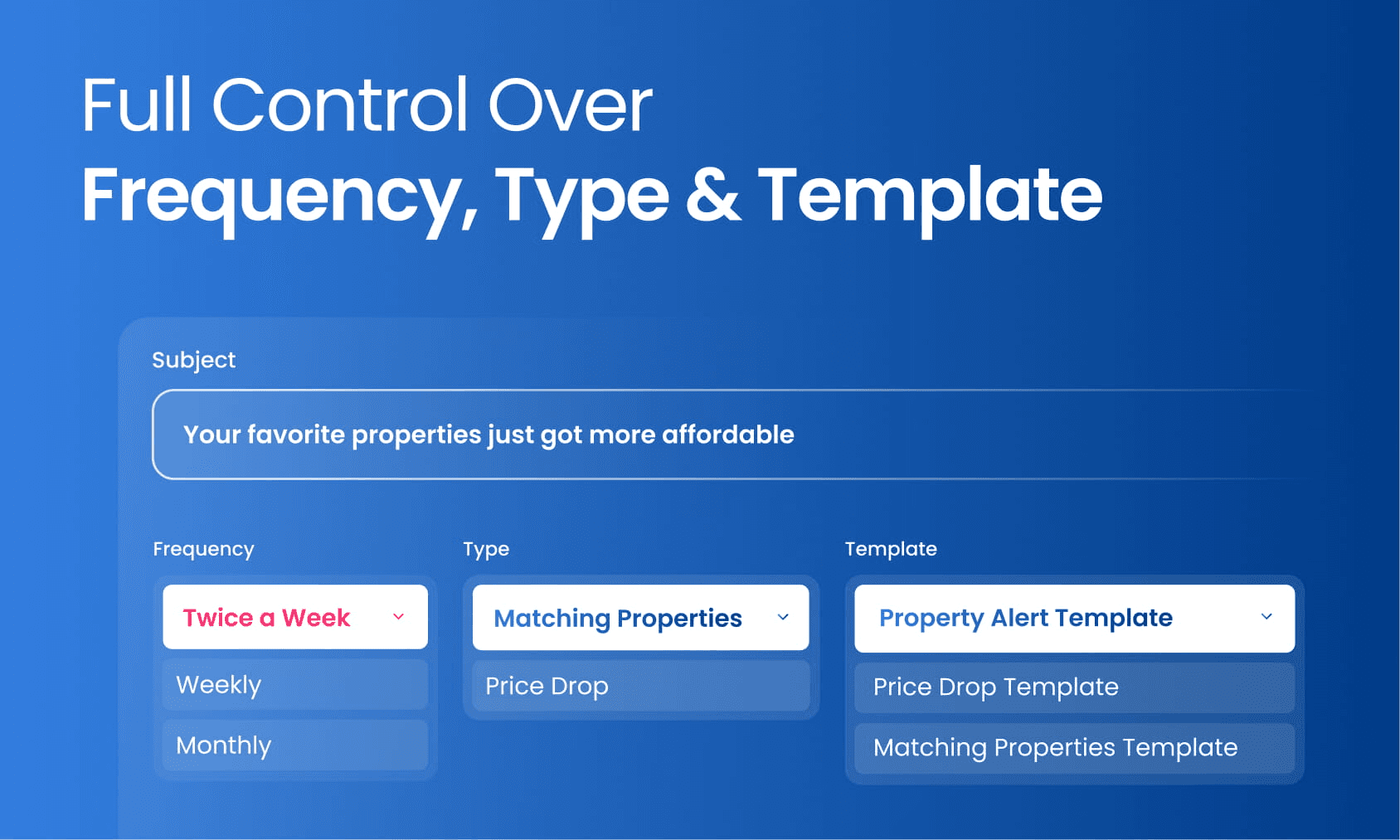
Choose how often alerts are sent, select between Matching Properties or Price Drop notifications, and pick the email template that fits your brand — all from one simple configuration screen.
Continuous lead engagement |
Keep every lead engaged 24/7 with relevant, timely updates — without adding to your team's workload. |
Instant price drop notifications |
When a price drops, your lead is the first to know. Speed matters — and Qobrix puts you ahead. |
Automated property matching |
Every new listing is automatically cross-referenced against active lead criteria. Matching leads are notified immediately. |
Complete communication history |
Every automated email is logged directly against the lead's record in Qobrix. Full visibility at all times. |
Built-in compliance tools |
Consent is requested automatically for new contacts, with privacy policy links included. Compliant by default. |
Fully branded communications |
Every email carries your agency's logo, colours, and contact details — professional and consistent, every time. |
Ready to activate Email Automation Alerts?
Start by following our step-by-step setup guide and make sure your campaigns, templates, lead preferences, and branding are ready before your first automated email is sent.
Back to Release Notes
Email Automation Alerts
Email Automation Alerts
Automate property alerts and keep leads engaged
Automation that keeps working when your team isn't.
Email Automation Alerts in Qobrix connect property activity directly to the right leads — no manual intervention required. Here's how it works:
1. Configure your brand and campaign
Set up your agency branding once inside Qobrix and create an Email Automation campaign. Choose your preferred send frequency — twice weekly, weekly, or monthly.
2. Set alert preferences per lead
On each lead record, activate Price Drop alerts, Matching Property alerts, or both. New contacts are automatically sent a consent request, keeping your communications compliant from day one.
3. Qobrix tracks every relevant change
When a new property matches a lead's buying criteria, or a tracked property drops in price, Qobrix detects it in real time — no manual monitoring required.
4. Your lead receives a branded email automatically
A fully branded, professionally formatted email is delivered directly to your lead with a link to the property. Zero agent effort required.
Choose how often alerts are sent, select between Matching Properties or Price Drop notifications, and pick the email template that fits your brand — all from one simple configuration screen.
Continuous lead engagement |
Keep every lead engaged 24/7 with relevant, timely updates — without adding to your team's workload. |
Instant price drop notifications |
When a price drops, your lead is the first to know. Speed matters — and Qobrix puts you ahead. |
Automated property matching |
Every new listing is automatically cross-referenced against active lead criteria. Matching leads are notified immediately. |
Complete communication history |
Every automated email is logged directly against the lead's record in Qobrix. Full visibility at all times. |
Built-in compliance tools |
Consent is requested automatically for new contacts, with privacy policy links included. Compliant by default. |
Fully branded communications |
Every email carries your agency's logo, colours, and contact details — professional and consistent, every time. |
Ready to activate Email Automation Alerts?
Start by following our step-by-step setup guide and make sure your campaigns, templates, lead preferences, and branding are ready before your first automated email is sent.
Back to Release Notes
Ready to run your real estate business with more clarity and control?
We help real estate teams replace disconnected tools with one connected system for managing properties, leads, websites, portals, automations, and reporting.
Ready to run your real estate business with more clarity and control?
We help real estate teams replace disconnected tools with one connected system for managing properties, leads, websites, portals, automations, and reporting.